
Deploy signatures everywhere.
Push email signatures to Gmail, Outlook, Apple Mail, and 60+ email clients. Use API keys for automatic deployment or guided manual install for self-service.
Download our apps for one-click signature installation.
Install SigStudio's desktop apps, browser extensions, or Outlook add-in to give your team the fastest way to apply and update their email signatures.
Browser Extensions
Install signatures in Gmail, New Outlook, and other webmail clients directly from your browser.
New Outlook Add-in
Sideload the SigStudio add-in XML file into your custom New Outlook Add-ins for signature insertion from your compose window.
macOS App
Install signatures into Apple Mail, Outlook for Mac, and Thunderbird on macOS.
Windows App
Install signatures directly into Outlook (older versions), Thunderbird, and Mailbird on Windows 10 & 11.
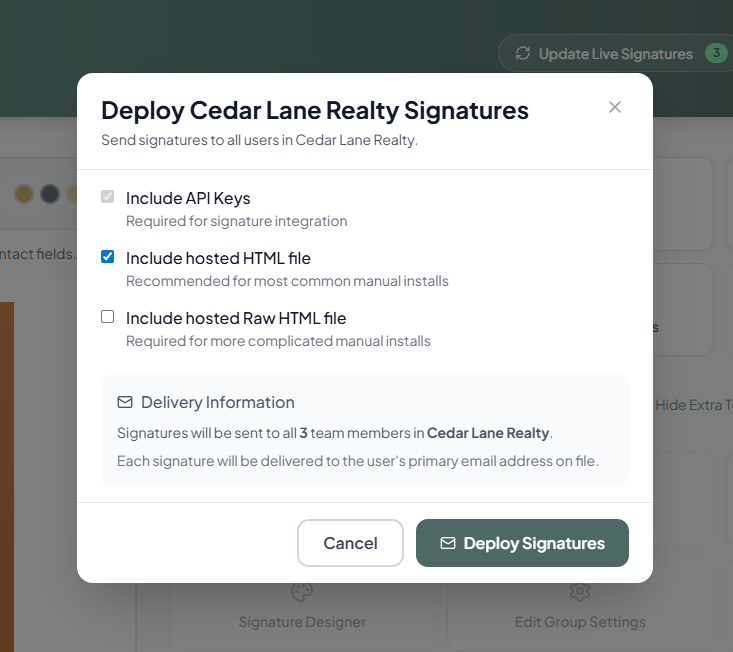
Push updates to every inbox instantly
No more chasing teammates to update their signatures. Deploy once and every email goes out on-brand.
-
API key installs -- Connect Gmail or Outlook and signatures update automatically
-
Hosted HTML deployment -- Share a hosted link that always serves the latest signature
-
Manual install guides -- Step-by-step guides for self-install on any email client
-
Auto-update signatures -- Change a template once and every deployed signature updates instantly
Every email client, app, and CRM -- covered.
Automatically install and update signatures across supported email clients, apps and CRMs using integrations and APIs, with guided setup available for all other email clients and applications.
 Gmail
Gmail
 Outlook
 Apple Mail
 iOS Mail
 Yahoo Mail
 HubSpot
 Salesforce
 + 60 more
Ready to deploy signatures to your team?
Get started with a $1 trial and set up automated deployment in minutes.